Before Sharing a File, Have You Checked What It Reveals About You?
Before sharing files online, understand the hidden privacy risks. Learn how to securely redact PDFs, remove EXIF metadata from images, inspect document properties, and protect sensitive information from accidental exposure. URL Slug file-privacy-pdf-redaction-exif-metadata Target Keywords - PDF Privacy - PDF Redaction - EXIF Metadata Removal - File Security - Document Privacy - Online File Proc
We share files almost every day.
A PDF contract, a photograph taken on a phone, an Excel spreadsheet, or a screenshot sent to a colleague. These are ordinary parts of modern work and everyday life. Most of the time, as long as a file opens correctly and looks the way it should, we send it without giving it much thought.
But there is something many people overlook: a file can contain information that isn't immediately visible.
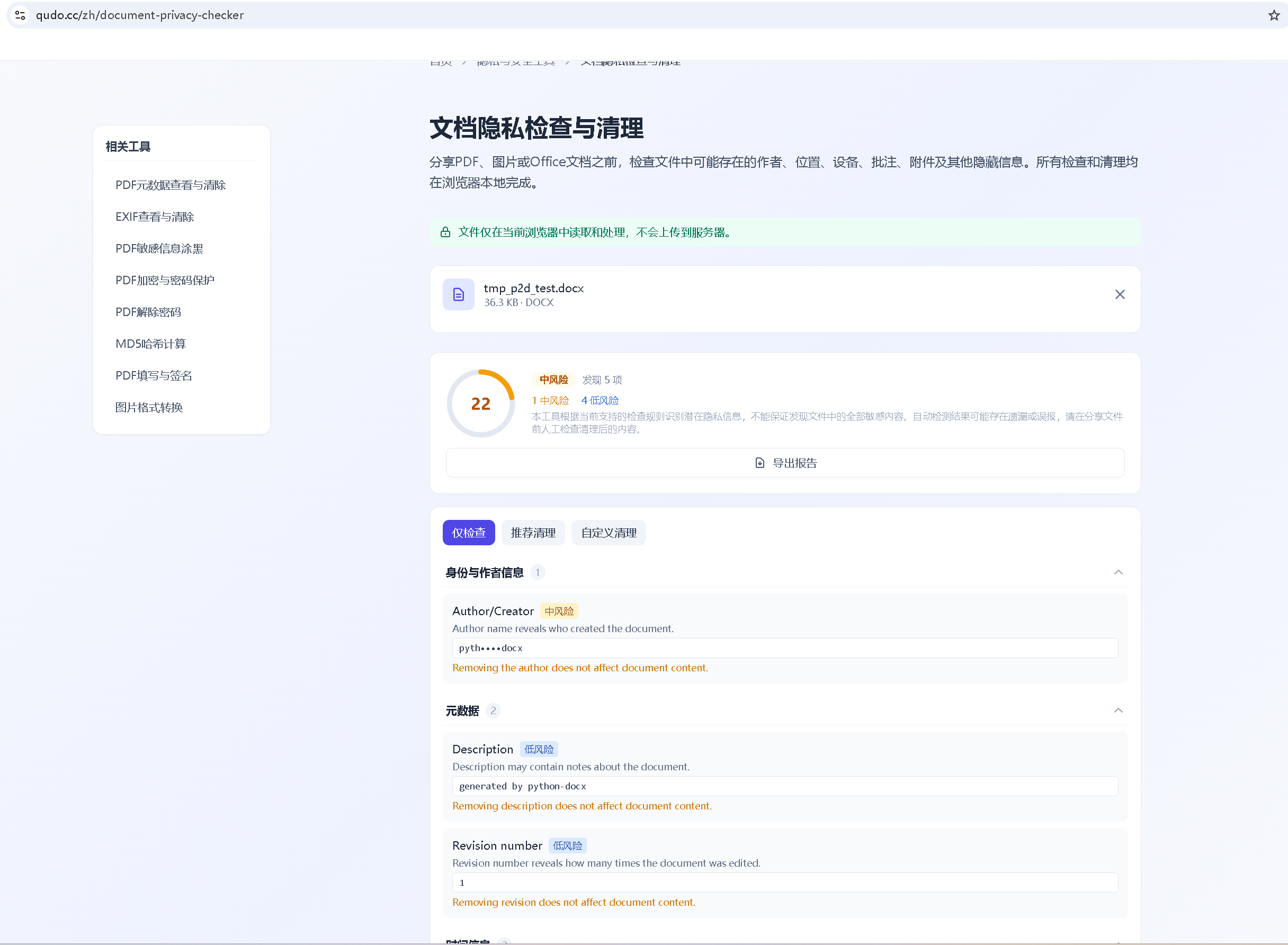
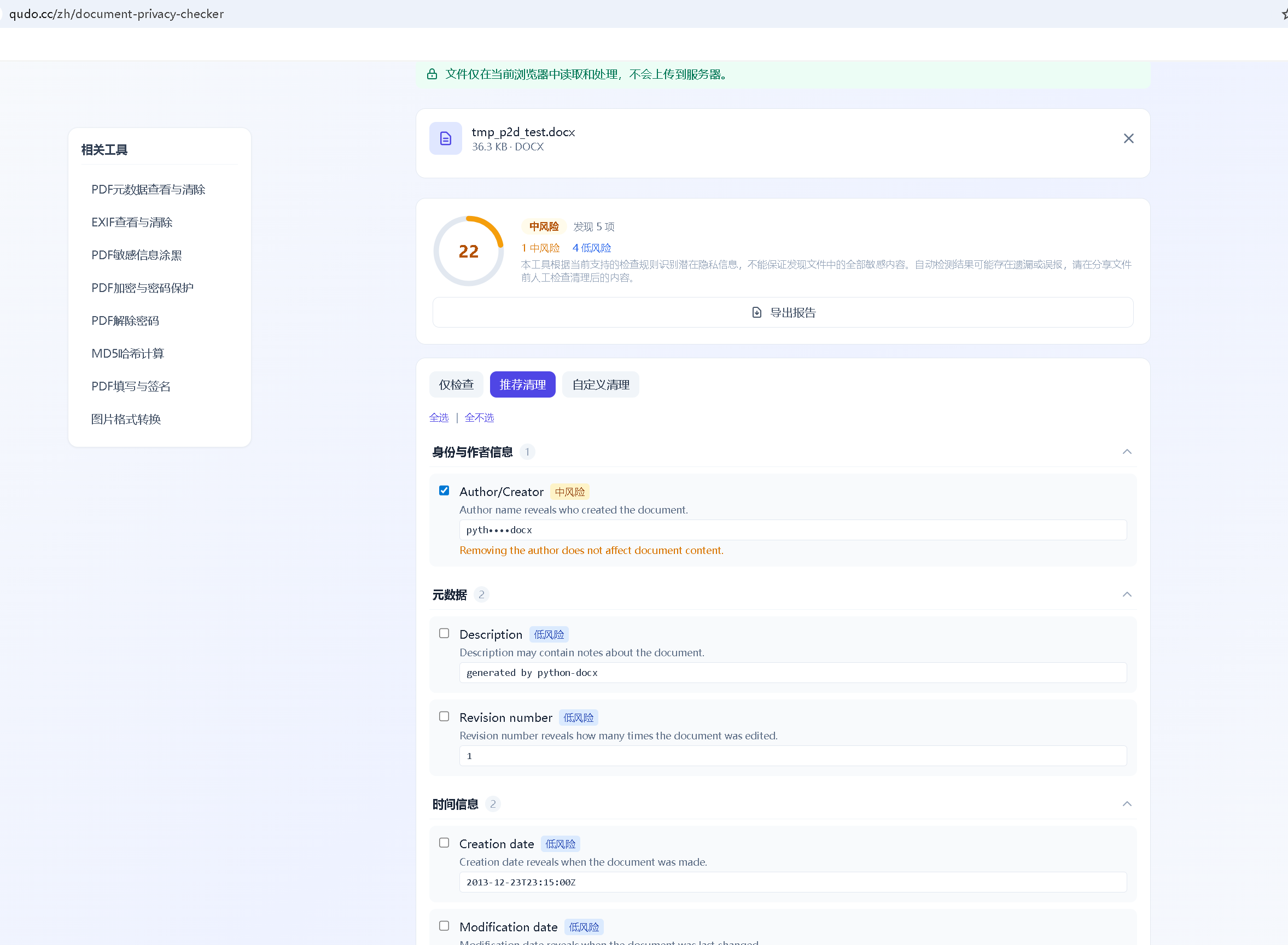
A photograph may reveal where it was taken. A Word document may still contain the original author's name or internal comments. Even a PDF that appears to have sensitive information covered up may retain the original text underneath.
These details are easy to miss, but they can matter more than we think.
Files Can Reveal More Than Their Visible Content
Digital files often carry information created during the process of making, editing, or saving them.
This information is known as metadata. It doesn't form part of the main content, but it can tell us quite a bit about a file.
Take smartphone photos, for example. Depending on the device and settings, EXIF metadata may include the date and time a picture was taken, the camera or phone model, camera settings, and sometimes GPS coordinates.
That last detail is particularly worth paying attention to.
Imagine taking a photograph at home and uploading it to a public website. If the image still contains location data, someone may be able to identify where it was taken without you ever mentioning the location.
The same issue applies to office documents.
A Word file prepared for a client might still contain internal comments or author information. An Excel spreadsheet could include hidden worksheets or data that isn't visible in the normal view.
None of this automatically means a file is unsafe. But when documents contain personal details, customer information, or confidential business data, it's worth knowing what is included before sharing them.
We often spend time checking the content of a file without checking the file itself.
Covering Text in a PDF Doesn't Always Remove It
This is one of the more common mistakes when handling sensitive documents.
Suppose you need to send a contract to someone outside your organization, but certain names, contact details, or financial figures must remain confidential.
The obvious solution might be to place a black rectangle over those sections.
The document looks fine. The information is no longer visible.
But there is a catch.
If the black rectangle is simply an object placed over the original text, the underlying content may still exist in the PDF. Depending on how the document was edited, someone could potentially select the text, copy it, search for it, or extract it using PDF tools.
This is why proper PDF redaction matters.
There is a real difference between visually covering information and permanently removing it.
Visual masking changes what appears on the page. Permanent redaction is designed to remove the underlying sensitive content so that it cannot be retrieved through ordinary text extraction.
If you regularly handle contracts, financial statements, legal documents, or customer records, this distinction is important.
Even after applying redaction, it's worth opening the exported file again and checking whether the removed text can still be selected or copied.
Never assume that information is gone simply because you can no longer see it.
The Information Hidden Inside Your Photos
Image metadata is another area that deserves more attention.
When we open a photograph, we naturally focus on the picture itself. Very few people think about checking the information stored alongside it.
Yet EXIF data can contain details such as:
The date and time the photograph was taken
The camera or smartphone model
Exposure settings and other camera information
GPS coordinates, if location recording was enabled
For photographers, some of this information is useful. It helps with organizing images, understanding camera settings, and maintaining records of their work.
But the situation changes when images are shared publicly.
A photograph taken at home, at a private office, or in another sensitive location may reveal more than its owner intended.
The answer isn't necessarily to remove all metadata from every image. Sometimes that information has legitimate value.
What matters is understanding what is there and deciding whether it needs to be shared.
The same thinking applies to documents. Author information and editing records may be useful internally, but they may not belong in a file being sent to an external client.
Privacy isn't about deleting everything. It's about knowing what should remain and what doesn't need to be there.
Choosing an Online File Tool: Look Beyond Its Features
Handling PDFs and images no longer requires installing professional software for every task. Many everyday operations can now be completed directly in a browser.
Merging PDFs, compressing images, converting file formats, inspecting metadata, and preparing documents for sharing are all tasks that online tools can make much easier.
However, there is another question worth asking when choosing a service:
Where is your file actually being processed?
Some online services require users to upload files to remote servers before processing begins. Others can perform supported operations locally within the browser.
There are practical differences between these approaches.
Browser-based local processing can reduce the need to transmit file contents to an external server. For everyday document and image tasks, this can be a useful privacy advantage.
However, local processing should not automatically be treated as a guarantee of complete security.
It's still worth understanding whether a tool communicates with third-party services, loads external resources, or transfers any information during use.
For confidential business documents, customer records, or regulated information, an approved desktop application or an organization's internal system may be the more appropriate choice.
Convenience matters, but it shouldn't be the only thing we consider when choosing a file processing tool.
A Small Check Before You Share
File privacy doesn't have to be complicated. In many cases, the problems come from simple oversights rather than sophisticated security threats.
A PDF is sent with sensitive text that was only visually covered. A photograph is uploaded with location information still attached. An internal document reaches an external recipient with comments that were never meant to be shared.
These situations are often avoidable.
Before sending an important file, take a moment to consider a few things:
Does the file contain personal or business information that shouldn't be shared?
Are there hidden comments, author details, or unnecessary metadata?
Has sensitive PDF content actually been removed rather than simply covered?
Does the exported file still contain information you intended to delete?
Do you understand how the tool you're using handles your data?
It only takes a little extra attention, but it can make a meaningful difference.
This is particularly important when working with customer records, financial information, contracts, and other documents that contain sensitive details.
Final Thoughts
We've become increasingly comfortable using online tools to create, edit, and share files. The process is faster than ever, and many tasks that once required dedicated software can now be completed in a few clicks.
But efficiency shouldn't come at the expense of privacy.
File security isn't only about preventing unauthorized access. It's also about making sure we don't unintentionally share information that was never meant to leave our devices or workplace.
A document can look polished, a photograph can look perfectly ordinary, and a PDF can appear to have been properly edited. Yet all three may still contain information worth checking.
The next time you send a PDF, upload a photograph, or share a business document, take a moment to look beyond what's visible.
A few minutes spent checking a file before sharing it can save a great deal of trouble later.