I Built a Proper PDF Watermarking Feature in Qudo Tool PDF
An overview of the design and improvements behind Qudo Tool PDF’s watermark feature. It supports text and image watermarks, nine-position placement, rotation, and opacity controls. Tiling spacing adapts to the watermark’s dimensions, while marks at page edges are clipped naturally—preventing overlap and crowding.
A PDF watermark may look like nothing more than a few words placed on a page. But once you start building the feature, you realize the hard part isn’t drawing the text—it’s making it look right across different page sizes, rotation angles, and watermark content.
When I built the watermark feature in QudoPDF, I split it into two modes: single watermark and tiled watermark.
A single watermark can be placed using a nine-position grid, with controls for margins, offsets, rotation, and opacity. Both text and image watermarks are supported. Image watermarks preserve their original aspect ratio and can be sized relative to the page width. Text watermarks need to account for font, size, bold styling, and Chinese and English characters.
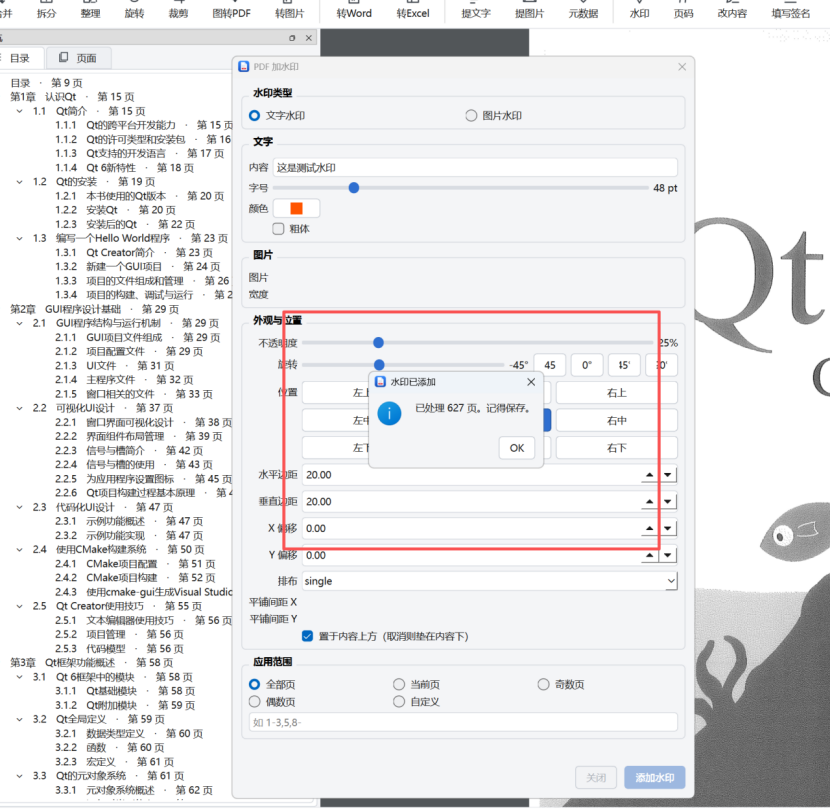
 When a page is rotated, its coordinates also need to be transformed so the watermark stays in the right place and orientation.
The first version of tiled watermarks didn’t look right. The marks overlapped, and those near the page edges crowded together. I traced the problem to the fixed center-to-center spacing: with larger text, longer strings, or greater rotation, a watermark could take up more space than the spacing allowed. Another issue was that edge marks were forced back inside the page, causing watermarks at different anchor points to overlap.
The fix was to estimate each watermark’s bounding box after rotation and use its actual dimensions to set the minimum spacing for the tile grid. Watermarks at the edges are now clipped naturally instead of being pulled back onto the page. This preserves the user’s spacing setting while keeping large or long watermarks from crowding the layout.
Another detail that’s easy to overlook is whether the watermark should appear above or beneath the page content. QudoPDF lets users choose. Place it above the content when it needs to stand out, or beneath it when readability matters more.
Building this kind of feature has taught me that adding a slider to the interface doesn’t mean the work is done. The real challenge is turning those settings into a stable, predictable layout: the pattern should hold when the page gets wider, the text gets longer, or the rotation changes.
This update addresses overlapping watermarks and crowding near page edges. Next, I’d like to improve the watermark preview and page selection, and make the layout more consistent across documents with mixed page orientations.
Links Qudo Tool PDF