How to Securely Share Bank Statements and Contracts?
Data Minimization · Permanent Redaction · Metadata Cleanup · Watermarking · Secure Transmission
Recommended Tool: https://www.qudo.cc/en/document-privacy-checker
Suitable for anyone who needs to share bank statements, contracts or other sensitive documents with third parties while protecting personal and business information.
This article helps you understand the sensitive information in bank statements and contracts, and introduces a complete workflow for secure sharing including content reduction, permanent redaction, metadata cleanup, watermarking, password protection and secure transmission. Qudo provides browser-local PDF processing tools.
Bank statements and contracts may look like ordinary documents, but they actually contain a large amount of sensitive information. A bank statement may reveal your name, account number, home address, income level, spending habits and transaction counterparties; a contract may contain ID numbers, signatures, company seals, quotations, customer lists, receiving accounts and business terms. Therefore, secure sharing cannot be simply understood as 'setting a password for the PDF'. A more reliable approach is: first confirm what the other party needs, then delete unnecessary information, clean hidden data in the file, and finally send through a controlled channel.
Important Note: Official Submissions Require Original Documents
Please note: Banks, courts, visa agencies, loan institutions, tax departments, notary offices and audit institutions may require submission of complete and unmodified original documents. In such cases, do not redact or delete content on your own. You should follow the official requirements of the receiving party and submit through official channels.
This guide is mainly applicable to non-official scenarios such as rental reviews, project evaluations, preliminary negotiations, etc. For official submissions, please prioritize the file integrity requirements of the receiving institution.
1. What Sensitive Information May Be in Bank Statements?
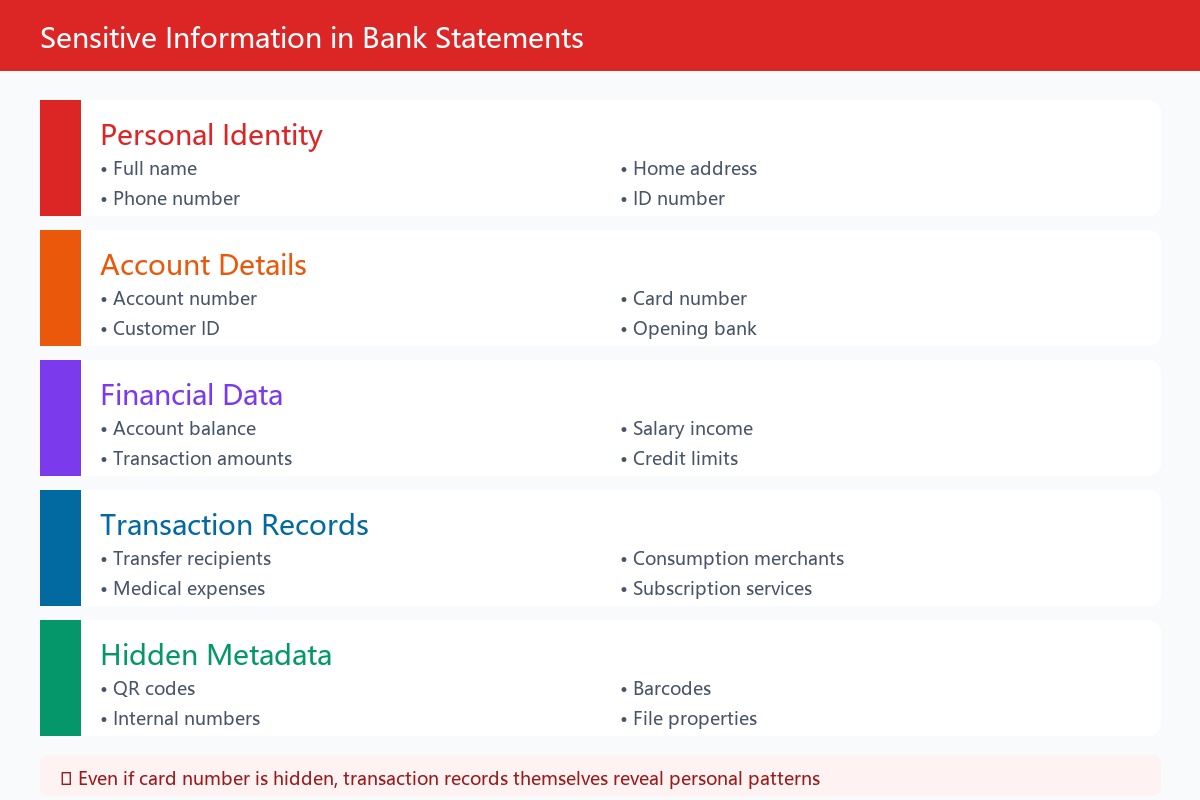
Many people only pay attention to the bank card number, but the transaction records themselves can also reveal a lot of personal information.
Common sensitive content includes: name, address and contact information; bank account number, customer number and card number; opening bank and branch name; account balance and available balance; salary income and employer; name or company name of transfer recipients; consumption merchants, subscription services and medical expenses; transaction dates, amounts, remarks and order numbers; loans, credit cards and other account information; QR codes, barcodes and internal numbers in the statement file.
Transaction records for several consecutive months may also expose personal work schedule, residential area, family relationships and spending capacity.
Therefore, even if the bank card number is hidden, it cannot be considered that the entire statement has been desensitized.
2. What Sensitive Information May Be in Contracts?
The risks of contracts come not only from the main text, but also from signature pages, attachments, annotations and file properties.
Key areas to check: names of contracting parties, company names and registered addresses; ID numbers, passport numbers and unified social credit codes; mobile numbers, emails and mailing addresses; bank accounts, opening banks and payment information; handwritten signatures, initials and company seals; contract amounts, discounts, settlement methods and quotations; names of customers, suppliers and partners; internal project names, product plans and technical solutions; attachments, supplementary agreements and quotation sheets; Word revision records, annotations and hidden text; PDF author, creation software and modification time; digital certificates and electronic signature information.
Some information is invisible on the page but still stored inside the file. For example, annotations, revision history and document authors in Word documents, as well as attachments, form values, metadata and hidden layers in PDFs.
3. Before Sharing, First Confirm What the Other Party Actually Needs
The most effective protection measure is not encryption, but sending less.
Before preparing documents, you should confirm the following questions with the receiving party: 1. Do they need the entire document or only some pages? 2. How long a time range is required for bank statements? 3. Is it necessary to show the complete account number? 4. Does every transaction need to be shown? 5. Is a version with irrelevant information hidden acceptable? 6. Must the original document issued by the bank or institution be submitted? 7. Is there an official upload platform? 8. Does the file need to retain digital signatures?
For example, if the other party only needs to prove account balance, you can ask whether they accept a certificate of assets issued by the bank, rather than directly sending half a year of transaction records.
If you only need to prove income, you can also ask whether they accept salary records, income certificates or transaction records within a limited time range.
Processing files according to 'only provide the information necessary to complete the current purpose' also conforms to the data minimization principle.
4. Copy the File First, Don't Modify the Original Directly
When processing bank statements or contracts, you should keep an unmodified original file.
It is recommended to create two versions: Original version: kept unchanged, stored in a secure location; Sharing version: used for deleting pages, redacting information, adding watermarks and setting passwords.
The sharing version can use a clear file name, for example: BankStatement_RentalReview_Redacted_2026-10.pdf
Do not use file names containing complete ID numbers, bank card numbers or other sensitive fields, because file names are usually not protected by PDF passwords, and may also appear in email subjects, download records and cloud drive logs.
5. Keep Only the Pages the Other Party Really Needs
If a bank statement has 30 pages and the other party only requires the most recent month, don't send all the records.
The following processing can be done: export bank statements for a specified date range; delete pages unrelated to the current purpose; split out the contract main text to be submitted; remove unrelated attachments and supplementary agreements; keep only the proof materials explicitly required by the other party.
But note: if the receiving party requires submission of 'complete originals', deleting pages may cause the file to be rejected. In this case, the file should be kept complete and submitted through secure official channels.
6. Use True Permanent Redaction
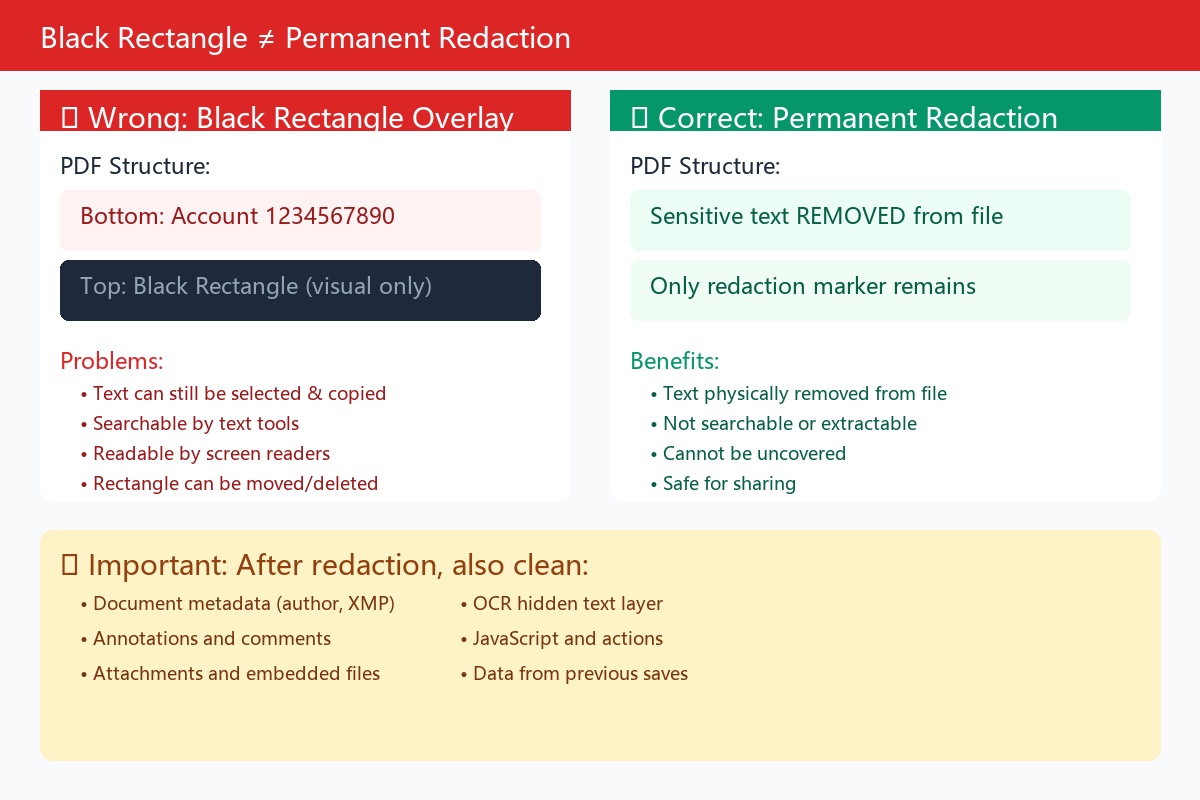
1. Black rectangles are not equal to deletion. Drawing a black rectangle on a PDF only covers the text. The text under the black rectangle may still be: selected and copied by the mouse; searched through PDF readers; extracted from the file; redisplayed after deleting the overlay layer; read by other tools; recovered from the OCR text layer. Blurring, mosaic, white font and cropping pages may not necessarily permanently delete the underlying content.
2. Correct approach. The 'permanent redaction' or 'Redaction' function of PDF should be used: 1. Open a copy of the file; 2. Mark the text or areas to be deleted; 3. Check the marking range; 4. Officially apply redaction; 5. Save as a new PDF; 6. Reopen and verify. Permanent redaction deletes the content corresponding to the selected area, not just covers the page appearance.
3. What content can be considered for redaction? On the premise that the receiving party allows, you can hide: transaction records unrelated to the purpose; names of unrelated transaction counterparties; complete bank card numbers, keeping only the last four digits; home addresses and phone numbers; ID numbers that do not need to be shown; bank accounts in contracts; handwritten signatures and seals; customer lists and trade secrets; personal information in unrelated attachments.
Do not redact information that the receiving party explicitly requires to verify, and do not modify amounts, dates or transaction nature through redaction.
7. Check and Clean Hidden Information in Files
After completing page redaction, you also need to check whether there is residual hidden information inside the file.
PDF needs to check: title, author, subject and keywords; creation time and modification time; file generation software; XMP metadata; annotations and comments; form filling records; embedded attachments; hidden layers; OCR text layer; JavaScript scripts; objects that have been deleted but still remain in the file structure.
Word documents need to check: document author and last modifier; revision records; annotations; hidden text; information in headers and footers; document properties; custom XML data; embedded objects; template names; old version content.
If the other party only needs to read the contract, you can usually share after cleaning the Word document and then exporting it as PDF. This can reduce the risk of revision records, macros and editable content being sent together.
However, converting to PDF does not mean that hidden information will definitely disappear automatically, and the PDF metadata should still be checked again.
8. Add Watermarks with Purpose Description
For bank statements and contracts, watermarks can be added in positions that do not affect reading, for example: For XX Company Rental Review Only; Not to be Transferred or Used for Other Purposes; Submission Date: October 13, 2026.
The recipient's name can also be added: For ABC Company Review Only.
This kind of watermark can: clarify the scope of file use; reduce the risk of files being used for other purposes; help trace the source when files are leaked; remind the receiving party to keep the file properly.
Watermarks are not encryption measures, and cannot prevent the other party from taking screenshots, printing or recreating files. It can only be used as a reminder and tracking method, and cannot replace permanent redaction, password protection and access control.
9. Set Open Password for the Final File
After completing content reduction, permanent redaction, metadata cleanup and watermark processing, set a password for the final PDF.
Basic requirements for passwords: it is recommended to contain at least 16 characters; mix uppercase and lowercase letters, numbers and symbols; do not use names, birthdays or phone numbers; do not use the last four digits of bank cards; do not use file names; do not repeat passwords from other websites; use different passwords for each important file.
Example structure: River!Lamp-27-Cedar-Blue. Do not copy the example directly, you should generate random and unique passwords yourself.
If the software and receiving environment support it, you can choose AES-256 encryption.
Do not put the password and file in the same email. Wrong way: The attachment is a bank statement, the password is 123456. Once the email account is stolen, the attacker will get both the file and the password.
More appropriate ways: the file is sent by email, and the password is informed by phone; the file is shared through a controlled link, and the password is sent by SMS; the file and password are transmitted through two different communication tools; after confirming the identity of the recipient, the password is informed separately.
10. Choose the Appropriate Sending Method
The security levels of different transmission methods are not the same.
Priority choice: Official upload platform of the institution. If banks, visa agencies, insurance companies or cooperating enterprises provide official upload pages, they should be used first. Check before uploading: whether the domain name is correct; whether the page uses HTTPS; whether login and multi-factor authentication are required; whether the link comes from official channels; whether there are submission records after upload is completed; how long the file will be saved; whether it can be actively deleted. Do not directly click upload links in strange emails or chat messages. You can manually enter the official website address of the institution, and then enter the submission page from the official website.
Second choice: Controlled file sharing. If using enterprise cloud drives or file sharing services, it is recommended to enable: designated account access; login verification; multi-factor authentication; access validity period; download restrictions; access logs; link revocation; prohibition of search engine indexing. Avoid choosing 'Anyone who gets the link can access'.
Third choice: Encrypted PDF plus email. In the absence of an official platform, the cleaned PDF can be set with a strong password and then sent to a verified email address, with the password informed through another channel. Check carefully before sending: whether the recipient address is correct; whether there are spelling errors in the domain name; whether a contact with the same name was accidentally selected; whether CC and BCC personnel are necessary; whether the reply address is consistent with the sending institution.
Try to avoid: public cloud drive links; sharing links without access period; multi-person chat groups; social media private messages; strange emails with unverified identities; unknown online file processing websites; public computers or public Wi-Fi environments; keeping original files in chat records for a long time.
11. Must Perform a Reverse Check Before Sending
Don't send immediately after processing is completed. You should stand in the receiver's perspective and reopen the final file to check.
Page content check: whether only necessary pages are kept; whether the redaction position is accurate; whether names, dates and amounts meet submission requirements; whether important content was accidentally deleted; whether watermarks cover key fields.
Redaction effectiveness check: try to perform on redacted areas: mouse selection; copy and paste; full-text search; page zoom; export text; open with other PDF readers. If the hidden information can still be searched or copied, it means the redaction has not really taken effect.
Hidden information check: check again: file properties; author information; annotations; attachments; form content; OCR text layer; hidden layers; creation software and modification records.
Password check: close the file and reopen it to confirm: a password must be entered to view; the password can be used normally; the file content is not damaged; the device used by the receiving party can open it; you have saved the password in a secure way.
Receiver check: finally verify: recipient name; email address; uploading institution name; file version; file name; number of attachments; sharing link permissions.
12. How to Handle Three Common Scenarios
Scenario 1: Providing bank statements when renting. First ask the landlord or agent what exactly they need to verify. If it's just to prove income, you can ask whether they accept: salary records; income certificate; balance certificate; statements for the most recent month or three months; formal certificate issued by the bank. With the other party's consent, consumption records, transaction counterparties and complete account numbers unrelated to income proof can be hidden, and a 'For Rental Review Only' watermark can be added. Do not modify balances, income or transaction content to meet rental conditions.
Scenario 2: Sending contract samples to cooperating parties. If the other party only needs to understand the contract structure, a desensitized sample can be made: hide original customer names; delete signatures and seals; hide bank accounts; delete specific contacts; hide business quotations; remove attachments unrelated to this communication; clean annotations, revisions and author information; add a 'For Project Evaluation Only' watermark. If the contract itself is subject to a confidentiality agreement, you should first confirm whether disclosure to third parties is allowed.
Scenario 3: Submitting materials to banks, courts or audit institutions. Such institutions usually value file integrity and authenticity. If the other party requires originals: do not delete pages on your own; do not redact fields required for verification; do not change amounts and dates; do not destroy electronic signatures; use the official upload channel provided by the institution; strictly submit according to file format and size requirements. If there is indeed irrelevant third-party personal information, you should first ask the receiving institution whether a desensitized version can be submitted.
13. Digital Signature Files Need Special Handling
Some contracts use digital certificate signatures. Performing the following operations on such files may cause the signature to become invalid: deleting pages; adding watermarks; redacting content; modifying forms; cleaning metadata; resaving; converting file formats.
Before processing, first check the signature status in the PDF reader. If the receiving party needs to verify the digital signature, it is best not to modify the original file, but to submit the original through a controlled channel.
If a desensitized reference version is also needed, you can prepare at the same time: unmodified formal original; reading version clearly marked as 'desensitized copy'. The two files should be clearly distinguished to avoid mistaking the desensitized version for the formal original.
14. What to Do After Sending?
Secure sharing does not end after clicking 'Send'. It is recommended to continue completing the following operations:
1. Confirm through known contact methods that the other party has received it; 2. Confirm that it was not sent to the wrong contact; 3. Set or check the expiration time of the sharing link; 4. Revoke access permissions that are no longer needed after the other party downloads; 5. Delete temporary files in public computers and download directories; 6. Clean up processing copies that are no longer needed; 7. Keep necessary original files and submission records; 8. Record sending time, recipient and file version; 9. If misdelivery is found, immediately revoke the link and contact the recipient to delete; 10. If necessary, modify accounts or credentials that may have been leaked.
If the misdelivered file contains ID documents, bank accounts, login credentials or trade secrets, the risk should be assessed as soon as possible, and you cannot just rely on the other party's verbal promise to delete.
15. Recommended Process Using Qudo
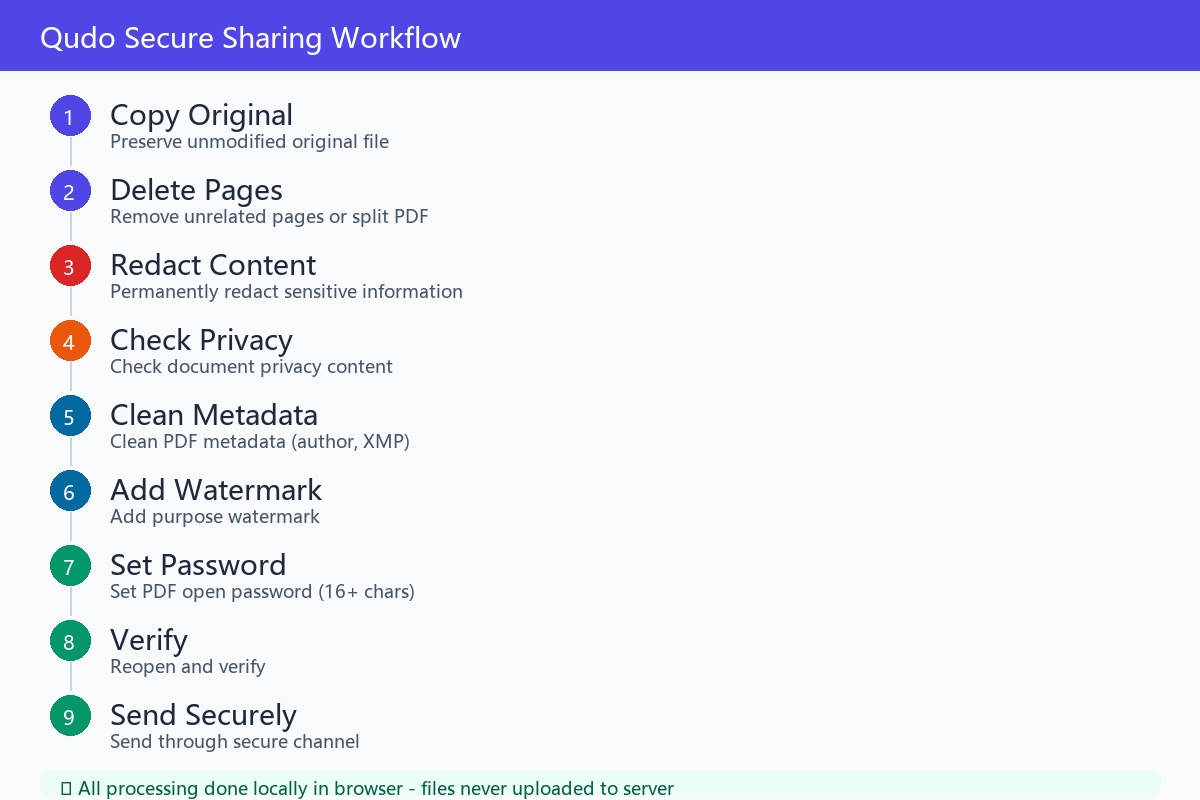
If you use Qudo's local processing tools, you can operate in the following order: Copy original file → Delete unrelated pages or split PDF → Permanently redact sensitive information → Check document privacy content → Clean PDF metadata → Add purpose watermark → Set PDF open password → Reopen and verify → Send through secure channel.
You can use separately: PDF Split Tool: keep only the pages to be submitted; PDF Permanent Redaction Tool: delete sensitive text and areas on the page; Document Privacy Check and Clean Tool: check potential privacy information; PDF Metadata Clean Tool: delete author, title and XMP data; PDF Watermark Tool: mark recipient and file purpose; PDF Password Protection Tool: set open password for the final file.
When using local processing tools, files are processed in the browser without uploading to the processing server. However, when finally sending the file, you still need to choose a trusted transmission channel. Local processing solves the 'privacy risk when processing files' and cannot replace identity verification and access control during the sending stage.
16. Common Mistakes
1. Only drawing black rectangles. Content may still be searchable, copyable or recoverable. True permanent redaction function should be used.
2. Thinking that no desensitization is needed after setting a password. The receiving party can still see all the content after opening the file. Password protection is for the transmission and storage process and does not reduce the information contained in the file.
3. Sending file and password together. Once the email or chat account is leaked, password protection loses its meaning.
4. Using simple passwords. Birthdays, mobile phone numbers, file names and the last four digits of bank cards are easy to guess.
5. Using public sharing links. Anyone who gets the link may access, download and forward the file.
6. Forgetting to clean annotations and attachments. The main text looks desensitized, but annotations, attachments or the OCR text layer may still contain original content.
7. Directly sending Word source files. Word files may contain revision records, author information, hidden text and old content. If the other party does not need to edit, sharing PDF after checking is usually more secure.
8. Accidentally destroying digital signatures. Editing signed PDFs may cause signature verification to fail. Signature requirements should be confirmed first before processing formal files.
9. Making misleading modifications to formal files. The purpose of desensitization is to reduce exposure of irrelevant information, not to change facts. Do not modify balances, dates, amounts, terms or transaction nature.
17. Frequently Asked Questions
Can bank statements be sent after redaction? It depends on the requirements of the receiving party. Ordinary rental reviews or informal proofs may accept desensitized versions, but banks, courts, visa agencies, audit institutions, etc. may require complete originals. You should confirm before processing.
Does the complete bank card number need to be hidden? If the other party does not need to verify the complete account number, you can ask whether only the last four digits need to be kept. Do not hide fields that the other party explicitly requires to verify on your own.
Is it more secure to take a screenshot of the file and send it? Not necessarily. Screenshots may still contain names, account numbers, balances and transaction records, and will reduce file quality and authenticity. Formal institutions usually prefer to receive original PDFs.
Can PDF compression delete metadata? Not guaranteed. Compression is mainly used to reduce file size and is not equal to permanent redaction or privacy cleanup.
Is setting 'no copying, no printing' useful? It has a certain restrictive effect, but cannot replace desensitization. Recipients may still take screenshots, and some software may also bypass permission settings.
Can the receiving party continue to forward encrypted PDFs? As long as the other party can open the file, they may save, screenshot or forward the decrypted content. Personalized watermarks, controlled platforms and designated account access can reduce risks, but cannot completely prevent it.
How long should files be kept? Only keep for the time necessary for business, legal or compliance. Temporary processing copies and public sharing links that are no longer needed should be deleted or revoked in a timely manner.
Can online PDF websites be used to process bank statements? You should choose carefully. Prioritize trusted tools that support browser-local processing. If files need to be uploaded to third-party servers, you should first read their privacy policy, retention period and deletion mechanism.
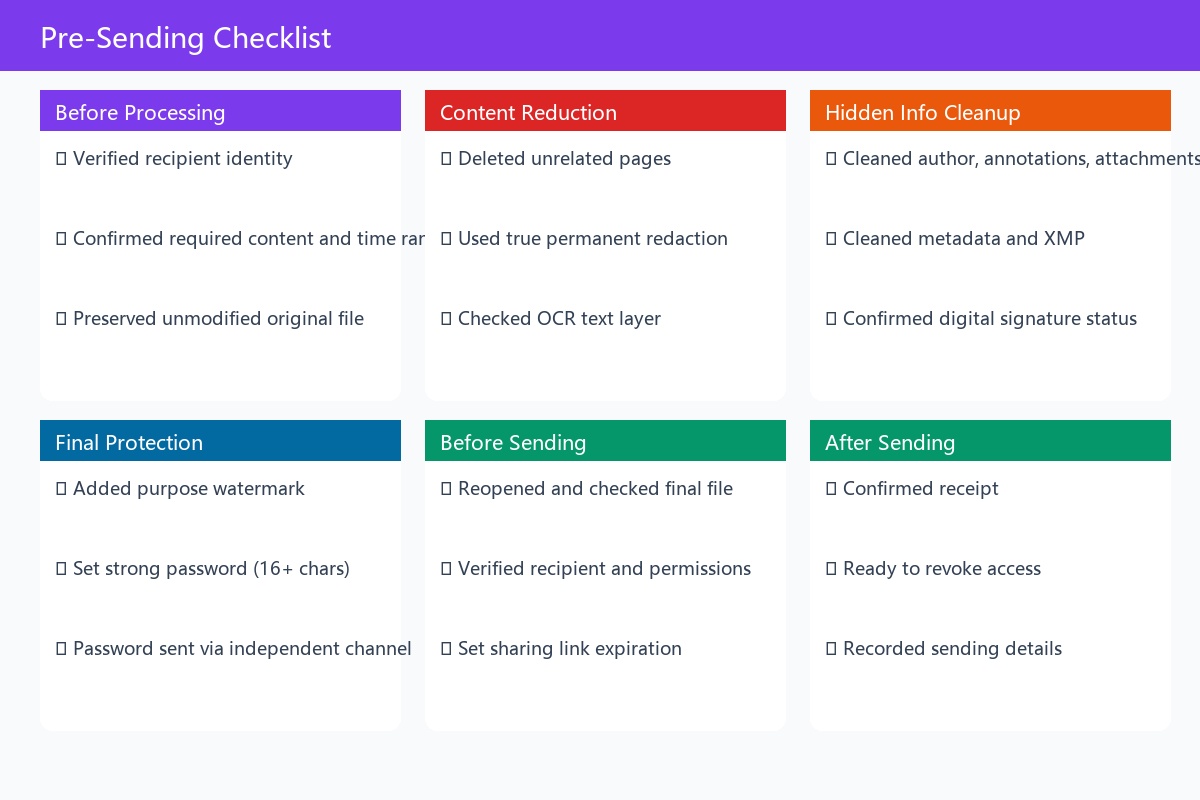
18. Pre-Sending Checklist
Before sending bank statements or contracts, you can confirm item by item:
☐ Recipient identity has been verified
☐ Content and time range required by the recipient has been confirmed
☐ Unmodified original file has been preserved
☐ Unrelated pages have been deleted
☐ True permanent redaction has been used
☐ OCR text layer has been checked
☐ Author, annotations, attachments and metadata have been cleaned
☐ Whether there are digital signatures has been confirmed
☐ Purpose watermark has been added
☐ Strong password has been set
☐ Password will be sent through an independent channel
☐ Final file has been reopened and checked
☐ Recipient and sharing permissions have been verified
☐ Sharing link has been set with expiration period
☐ Ready to revoke access permissions after sending
Summary
The core of securely sharing bank statements and contracts is not choosing a certain encryption software, but establishing a complete processing workflow:
Confirm purpose → Reduce content → Permanently desensitize → Clean hidden data → Set password → Verify recipient → Use controlled channel → Revoke access after sending.
For ordinary purposes, try to share only the information necessary to complete the review; for official purposes such as banks, courts, visas and audits, the file integrity requirements of the receiving institution should be prioritized.
At no time should the facts expressed by the file be modified in order to protect privacy. Desensitized copies should be clearly marked, original files should be saved securely, and the two must not be confused.